Better Edit Post Page
I've long been slightly annoyed at the edit post page because it just feels like the area I write in is unnecessarily constricted, and there's too much empty space. A bigger frustration has been that there are two separate scrollbars - one for the page, and another for the textarea you actually write in.
These dashboard styles fix that. I do think a better version of this can be made. The post header area still takes up too much space IMO. And this modification works better on desktop than on mobile. But this is what I was able to throw together in just a few minutes. (If you follow my Bearblog Posts, you can find out when/if I post a new version).
Note: It's disabled on the home page (Nov 26, 2025 update)
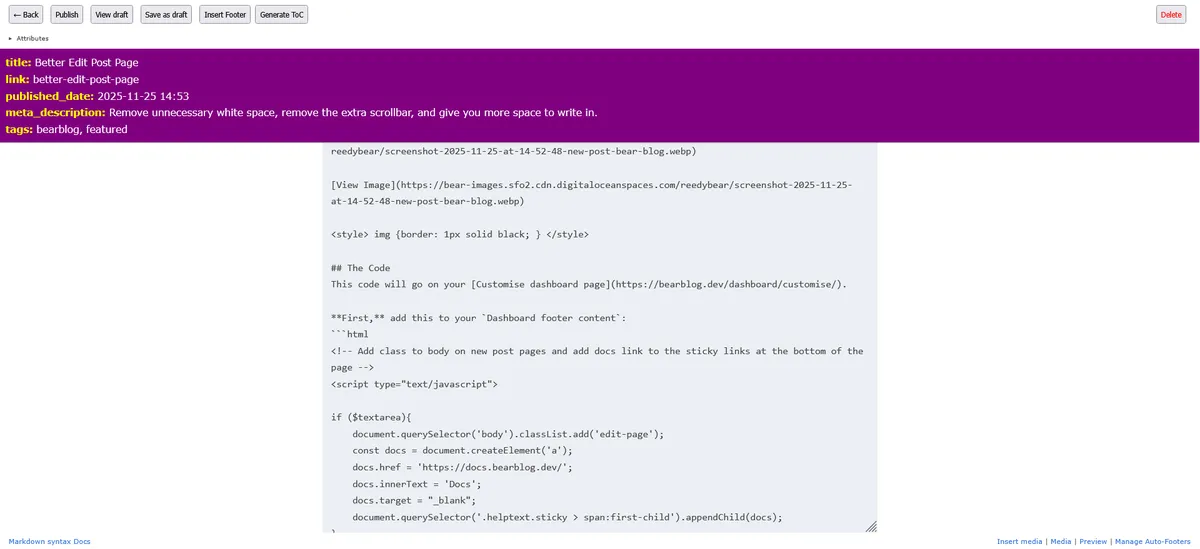
The Code
This code will go on your Customise dashboard page.
First, add this to your Dashboard footer content:
<!-- Add class to body on new post pages -->
<script>

if ($textarea
    && document.querySelector('body > main > h1:first-child')?.innerText?.trim() != 'Home'
){
    document.querySelector('body').classList.add('edit-page');
    const docs = document.createElement('a');
    docs.href = 'https://docs.bearblog.dev/';
    docs.innerText = 'Docs';
    docs.target = "_blank";
    document.querySelector('.helptext.sticky > span:first-child').appendChild(docs);
}
</script>
That block of code above modifies the HTML so that the styles below will only affect the edit post page. It also adds a 'docs' link to the links at the bottom, since the normal footer is hidden.
Second, add these styles to Dashboard styles:
html:has(> body.edit-page){
    height: 100%;
}
body.edit-page {
    width: 100%;
    max-width: 100%;
    margin: 0;
    padding: 0;
    height: 100%;
}
body.edit-page main {
    height: 100%;
}

body.edit-page .helptext.sticky {
    padding: 4px 16px;
}

body.edit-page header, body.edit-page footer {
    display: none;
}

body.edit-page .post-form .sticky-controls {
    margin: 0px;
    padding: 4px 16px;
}
body.edit-page .sticky-controls button {
    padding: 8px;
    margin-right: 8px;
}

body.edit-page details {
    margin: 8px 16px;
}

body.edit-page form.post-form {
    display:flex;
    flex-direction:column;
    height: 100%;
}
body.edit-page form.post-form textarea {
    flex: 2;
    max-width: 1000px;
    max-width: 100ch;
    margin-left: auto;
    margin-right: auto;
    padding: 4px 16px;
}
Also, if you like my purple/yellow, add these styles as well:
#header_content {
    background:purple;
    color: white;
}
#header_content b {
    color:yellow;
}